First Cash Review
Check cash inputs, triage the finance overview, and test one decision about the future.
Summary
This first review gives you a base that you can trust. You check the source data, read the finance command center, open the most important records, and test one cash assumption.
Capabilities
Eigenn enables you to connect financial accounts, import transactions, review cash, revenue, profit, and runway metrics, investigate priority finance issues, drill into specific actions relating to invoices and budgets, and model future cash flow with configurable downside scenarios.
Prerequisites
Before You Start
- Join the workspace as an Owner or a Member if you need to change records, budgets, or forecasts. A Viewer can read most finance pages but cannot run a write-backed forecast.
- Connect the intended cash accounts under Settings → Account → Bank Connections.
- Import or sync transaction history.
- Add the current invoices if receivables are part of the review.
Concepts
A cash review checks both your actual cash position from live bank data and analyzes financial performance indicators such as revenue, profit, and runway. The command center in Eigenn aggregates critical issues and provides guided action queues. Downside and stress tests use forecast models, separate from budgeting, to evaluate potential risks to cash flow.
Workflow
1. Check source freshness
- Open Settings → Account → Bank Connections.
- Confirm that you connected and turned on each account that contributes to cash.
- Resolve any connection that needs attention.
- Wait for the current sync to finish before you treat balances or recent transactions as complete.
Eigenn's finance overview does not show one universal last-updated timestamp. You must check source health at the connection.
2. Open the command center
- Select Finances in the main sidebar.
- Select Overview.
- Set Reporting period to a range that matches the review.
Last 4 weeks is useful for a first short-term cash review. Custom range lets you enter the exact From and To dates. A change to the period updates the historical metrics and the action queries. The cash tile stays the current connected-account total.
3. Read the owner brief
Record these items outside the page or in the source working records:
- the promoted owner-brief issue
- the business-health score
- the weakest signal: revenue growth, expense control, cash flow, or profitability
The score is a triage device. It is not a reconciliation status.
4. Work Do these first
- Read the three visible priority items from top to bottom.
- Open every Critical item.
- Decide if the Warning items need action this week.
- Use Info items for preventive follow-up.
The links lead to the correct working area:
- Invoices and collection problems open Invoices or Receivables
- Over-budget categories open Finances → Reports
- Bank errors open Settings → Account → Bank Connections
- Cards that expire open Customers
If the queue is empty, check source freshness anyway. Nothing urgent is blocking cash right now means that no alert bucket fired. It is not a reconciliation certificate.
5. Validate the business pulse
Check each tile:
| Tile | Check |
|---|---|
| Revenue | Do the selected-period total and the direction against the same period last year match the source records? |
| Profit | Is the sign plausible for the recorded revenue and expenses? |
| Cash | Does current cash use the accounts and the currency that you turned on? |
| Runway | Is it a number, or Unknown because the cash or forecast context is absent? |
Runway at or below three months is the tightest guidance state. More than three months and up to six months is a warning range. Eigenn describes more than six months as workable. You must still run a stress test before a major commitment.
6. Review money levers
Use the three panels:
- Open the receivables actions in Make more money.
- Compare the next-month projection with the current-period revenue.
- Read the profit in Lose less money.
- Select Review spend when an expense or budget issue needs detail.
- Note the six-month projected revenue in Plan what may be coming.
- Select Run stress test.
These panels mix data types deliberately. Eigenn observes the current-period revenue and profit. Next-month revenue, six-month projected revenue, and runway are forecasts.
7. Test one downside
- Open Forecast.
- Select 6 months, 12 months, or 24 months.
- Select Tune forecast, then apply Slow collections or Severe stress test under Quick presets.
- Wait for Assumptions active and the charts to refresh.
- Compare Baseline with Active plan.
- Read Runway P50, P10/P90, Cash-negative odds, and the first pressure month.
Do not create a budget only to run this test. Forecast assumptions do not edit the budget plan.
8. Finish with evidence
Your first cash review is complete when:
- You connected every expected account, and the data is current
- Every critical queue item has an owner, or you resolved it in its working page
- Cash, revenue, profit, and runway are explainable
- You can state which figures Eigenn observes and which figures Eigenn projects
- You compared one relevant downside with the baseline
- You know the first month that becomes Watch, High, or Critical, if there is one
Overview has no Complete review button. The evidence is in the resolved source records and the forecast that you examined.
Behavior specification
Troubleshoot
Cash and transaction history disagree
Return to Settings → Account → Bank Connections. Confirm that the account is on and that the sync is healthy. Then use Transactions to examine the ledger.
No action items appear
This can be a healthy state. It can also show missing invoice, payment, budget, or connection data. Check those sources before you conclude that there is no risk.
The forecast is unavailable
Ask a workspace Owner or Member to confirm Forecast access. Viewer access is not enough to run the forecast.
The scenario has no effect
Confirm that the preset or the lever appears in Active assumptions. Give both an amount and a date for a one-time expense.
Diagrams
Rendering diagram…
Screenshots
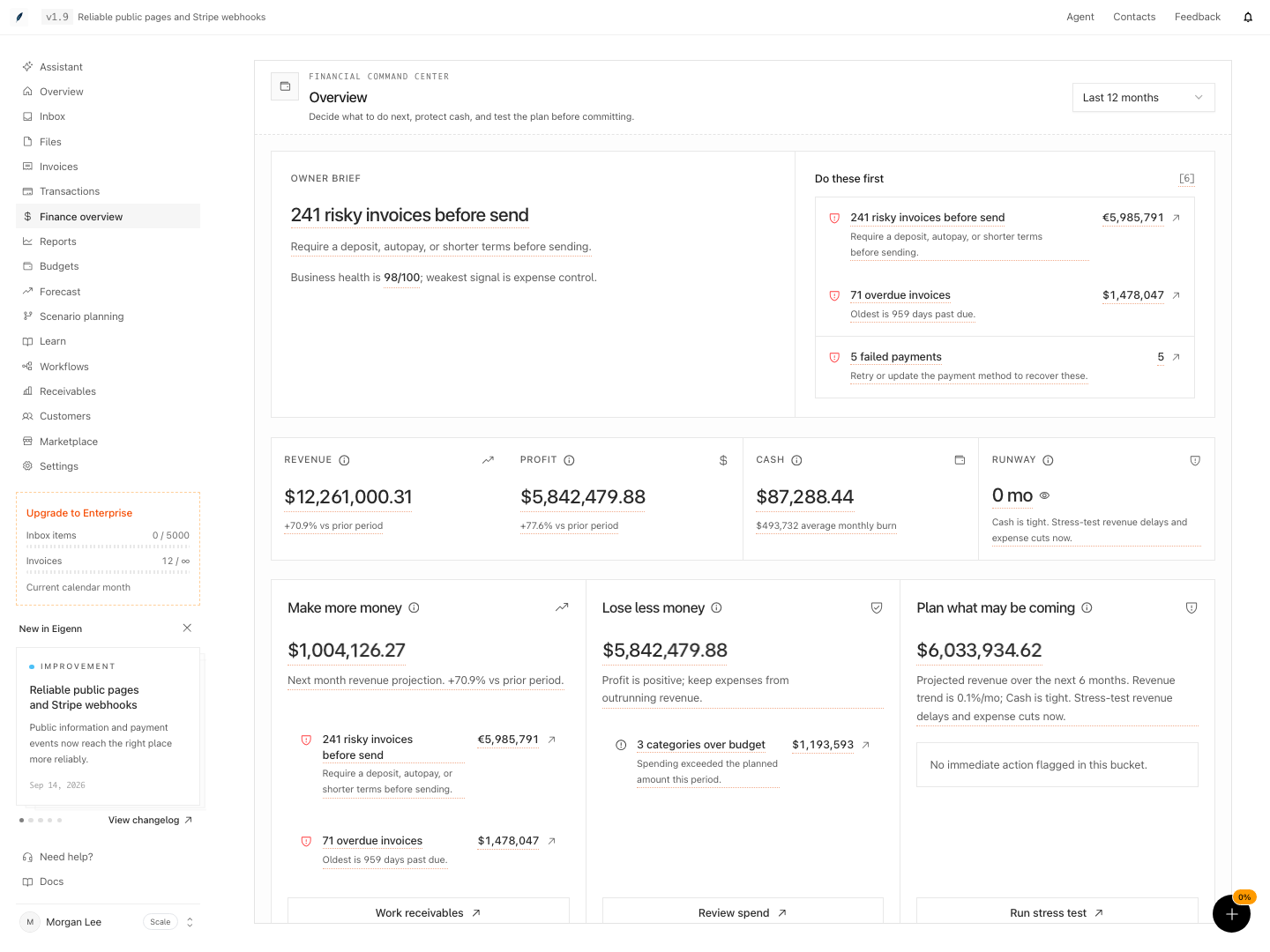
Shown with synthetic data in a local workspace.
Verification
- Check all expected cash accounts appear and are synced by reviewing Settings → Account → Bank Connections. You should see current status for each account.
- In the Overview dashboard, ensure the reporting period matches the business review. The cash tile should reflect the current connected-account total.
- The owner brief should list a business-health score and top issues—compare these with your working records.
- Review the priority action queue; opening each critical link should direct you to the associated detail area, such as Invoices or Reports.
- Validate each dashboard tile: Revenue, Profit, Cash, and Runway should agree with your source bank/finance records and plausible calculations.
- In the Make more money, Lose less money, and Plan what may be coming panels, all values and links should match the underlying data context.
- In Forecast, applying a Quick preset (e.g. Severe stress) should refresh the chart and update the runway metrics for Baseline vs. Active plan.
- At the end, you should have clear evidence (in the dashboard and in your own documentation) that account connections, action queue items, dashboard figures, and forecast stress test results are valid and up to date.