Weekly CFO Review
Run a repeatable review across source health, cash, reports, budgets, invoices, and forecast risk.
Summary
This cadence keeps actuals, plans, and scenarios in one sequence and does not confuse them. It works for a founder, fractional CFO, bookkeeper, or finance operator.
Capabilities
Roles and access
- Owners and Members can read finance data, change budgets, and run forecast and saved-scenario operations.
- Viewers can read team finance queries but cannot change budgets or run the write-backed Forecast workbench.
- The finance pages are live signed-in workspace views. CSV and Print are handoff tools. They do not create a public shared page.
Prerequisites
Before the meeting
- Open Settings → Account → Bank Connections.
- Resolve connections that need attention.
- Let the latest sync finish.
- Confirm that Eigenn recorded the current invoices and payment outcomes.
- Make sure that planned monthly targets exist under Finances → Budgets.
- Choose the reporting period that the team uses consistently.
Concepts
Status reference
| Status | Interpretation |
|---|---|
| Critical / Warning / Info on Overview | Priority order for rule-based action items. |
| Over budget / Under budget | Expense actual is above or below plan. |
| Above target / Below target | Revenue actual is above or below plan. |
| On track in Track & pace | Projected current-month result is favorable for the selected budget type. |
| Low / Moderate / High / Critical risk | Less than 10%, 10% to less than 25%, 25% to less than 50%, or at least 50% chance of any negative-cash month. |
| > horizon | No cash breach happens inside the chosen forecast horizon. |
| Insufficient history | The available history cannot support a calibration or a forecast. |
Workflow
1. Start with the command center
Open Overview and set Reporting period.
Examine:
- Owner brief
- business-health score and weakest signal
- Do these first
- Revenue, Profit, Cash, and Runway
- Make more money, Lose less money, and Plan what may be coming
Open every critical action before you continue. The queue shows only the first three items. It is a triage list, not a complete ledger.
2. Review invoice and collection exposure
Use:
- Invoices → Insights for reporting-oriented invoice analysis
- Receivables for collection execution
- the linked invoice or customer record for specific follow-up
Keep invoice data separate from cash:
- unpaid invoice value gives collection context
- it is not current bank cash
- a change of invoice status does not rewrite historical transaction actuals
3. Review the observed financials
Open Finances → Reports.
- Select the same reporting period that you used on Overview.
- Use Grid for the chart deck.
- Examine the KPI strip: Revenue, Profit, Burn Rate, Runway, and Cash Balance.
- Scan the curated charts, especially cash flow, burn, account-balance trends, expenses, revenue, and tax.
- Switch to Table for This period, Same period last year, and Change across Revenue, Expenses, Profit, and Profit margin.
Use Export CSV when you need the four-row variance dataset. Use Print for the current printable page. CSV does not export every chart's raw series.
4. Review plan versus actual
Open Finances → Budgets.
- Choose Expense or Revenue. When you select All types, the summary and the pace default to Expense.
- Examine Budget vs Actual:
- expenses are favorable when actual is at or below budget
- revenue is favorable when actual is at or above target
- Examine Track & pace:
- current-month projected value extrapolates the month-to-date run rate
- the annual projection uses actuals through the current month and budgets for future months
- Use List for individual monthly records or Grid for the annual category-by-month plan.
Budget values are the plan. Actuals come from recorded revenue or expense data. A forecast does not automatically overwrite either.
5. Review the forecast
Open Finances → Forecast.
- Choose 6 months, 12 months, or 24 months.
- Confirm the no-driver baseline.
- Examine Runway P50, the P10 and P90 values in its hint line, and Cash-negative odds.
- Apply the relevant scenario: revenue shock, new headcount, expense surge, collection dates, customer cancellation, recovery, one-time expense, or FX.
- Compare Baseline, Active plan, and Defensive plan.
- Note the first Watch, High, or Critical month.
Use Model real payment behavior when observed customer payment lag and promise reliability must adjust the expected collection dates.
6. Close the review
Before you end the review, be able to state:
- source problems that can make current data stale
- critical collection or payment actions
- current cash and selected-period performance
- budget categories that are unfavorable
- the baseline runway distribution
- the downside assumptions that you tested
- the first pressure month and mitigation
Eigenn does not give a Close weekly review control on these pages. Resolve or assign work in the source records. Use the CSV, printed report, saved scenario name, or your team's meeting system as evidence.
Behavior specification
Troubleshoot
Overview and Reports disagree
Confirm that both pages use the same reporting period and currency. Cash is current across the accounts that you turned on. Revenue and profit are period totals.
Reports look current but cash does not
Check Settings → Account → Bank Connections. Reports has no page-wide last-sync badge.
The budget pace looks wrong
Confirm the selected budget type and current month. The pace extrapolates month-to-date actuals linearly. It is not the probabilistic cash forecast.
Forecast differs from the budget
That is normal. The Forecast workbench models historical revenue, expenses, cash, and explicit drivers. Budget cells do not automatically become forecast drivers.
A Viewer cannot run the forecast
Ask an Owner or a Member to run the scenario and save it. A Forecast run is a team write operation.
Diagrams
Rendering diagram…
Screenshots
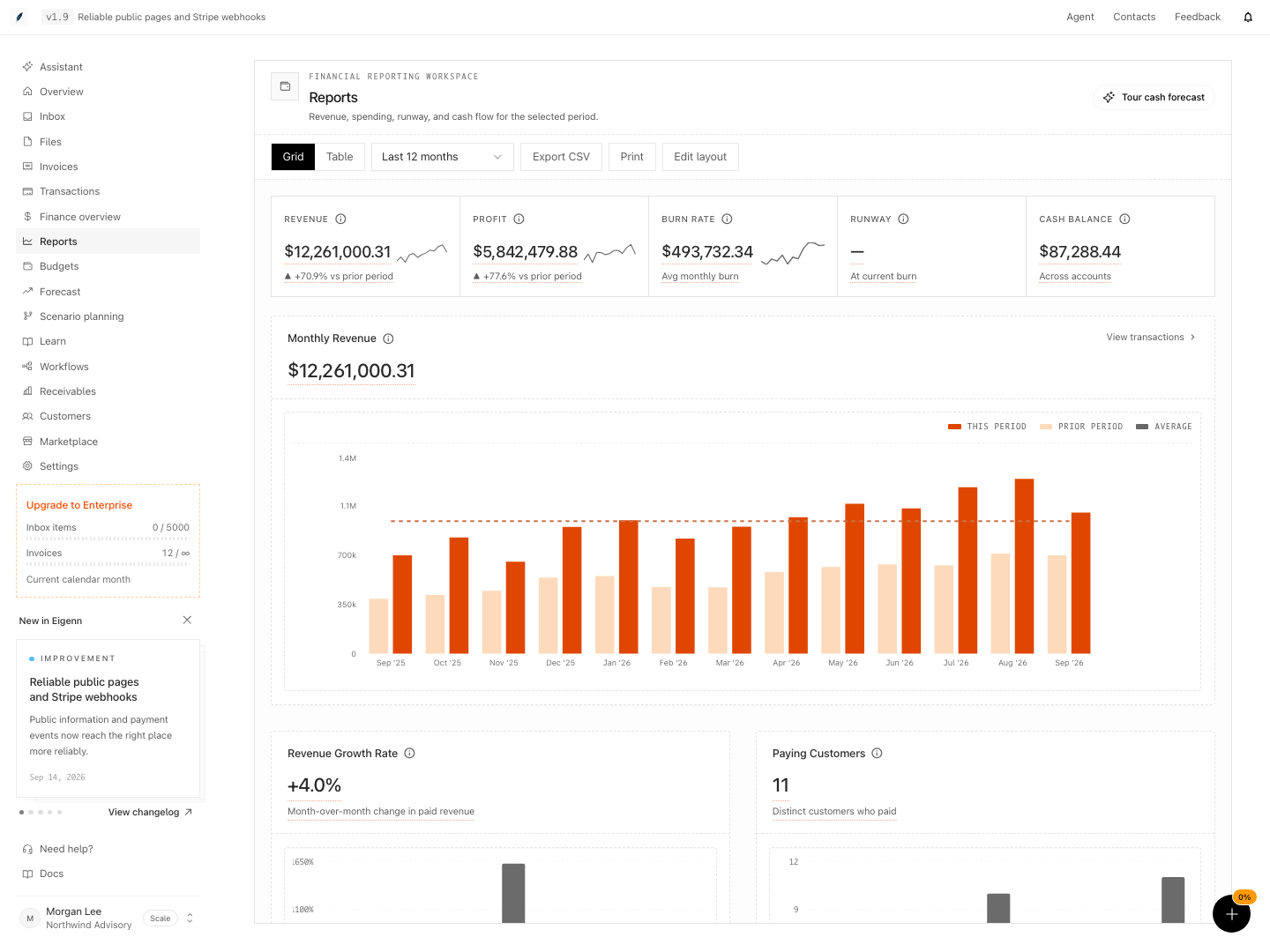
Shown with synthetic data in a local workspace.
Verification
- Log in with Owner or Member access and confirm all connected bank accounts display as synced in Settings.
- Navigate to Overview and confirm the 'Owner brief' and triage items are visible and actionable.
- In Invoices → Insights, verify you see both overdue and paid invoices separately from current cash figures.
- In Finances → Reports, switch between Grid and Table, ensuring Revenue, Profit, Burn Rate, Runway, and Cash Balance reflect the selected reporting period.
- Under Finances → Budgets, confirm that Budget vs Actual and Track & pace distinguish between plan and actual and display correct directional favorability for revenue and expenses.
- In Finances → Forecast, validate the baseline, alternative scenarios, and cash-negative odds for different forecast horizons, and confirm Runway P50, P10, and P90 are presented.
- At the end of review, confirm you can enumerate the findings for collections, cash, budgets, and risk distribution, and that there is no 'Close weekly review' button, leaving documentation or assignments to team records.